Document Parsing API
One Call, Structured Data
One API call to extract structured data from any document. RESTful, fast, and accurate — powered by Google Gemini 2.5 Pro.
No credit card required · 30 free pages/month
Why Parsli?
Skip building your own OCR pipeline
Without Parsli
- Building and maintaining custom OCR pipelines
- Training ML models on your own document data
- Handling different document formats and layouts
- OCR accuracy drops on scanned or noisy documents
- Weeks of development before you can extract a field
With Parsli
- Single REST endpoint for all document types
- Pre-trained AI — no training data from you
- Handles PDFs, images, scans, any layout
- AI-enhanced OCR for high accuracy on any input
- Start extracting in minutes with your API key
Replace months of OCR pipeline work with a single API call.
Pre-Trained AI — No Training Data Required
Parsli's AI is already trained on millions of documents. Send any document type and get structured data back — no training data, no model fine-tuning from you.
Compatibility
Every document format supported
How It Works
Three steps to structured data
Send Document via REST API
POST your PDF, image, or scan to the extraction endpoint with your API key and schema ID.
AI Extracts Per Your Schema
Parsli processes the document against your defined extraction schema — custom fields, types, and instructions.
Get Structured JSON Response
Receive clean, typed JSON with extracted fields, confidence scores, and metadata. Ready for your pipeline. Learn more about [PDF to JSON extraction](/guides/pdf-to-json-extraction).
See It In Action
From document to structured data in minutes
No complex setup. No code required. Just define what you need and let AI do the rest.
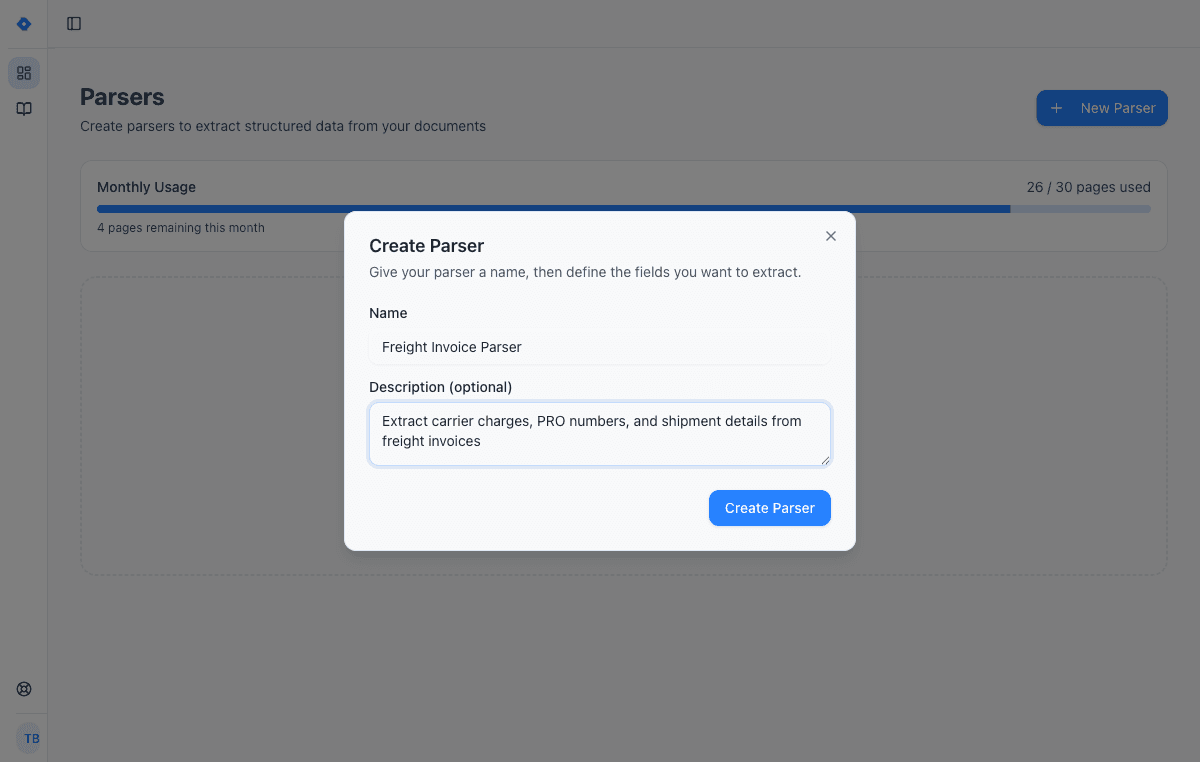
Create a parser
Give your parser a name and description. Each parser is a reusable extraction template — create one for invoices, another for receipts, another for contracts.
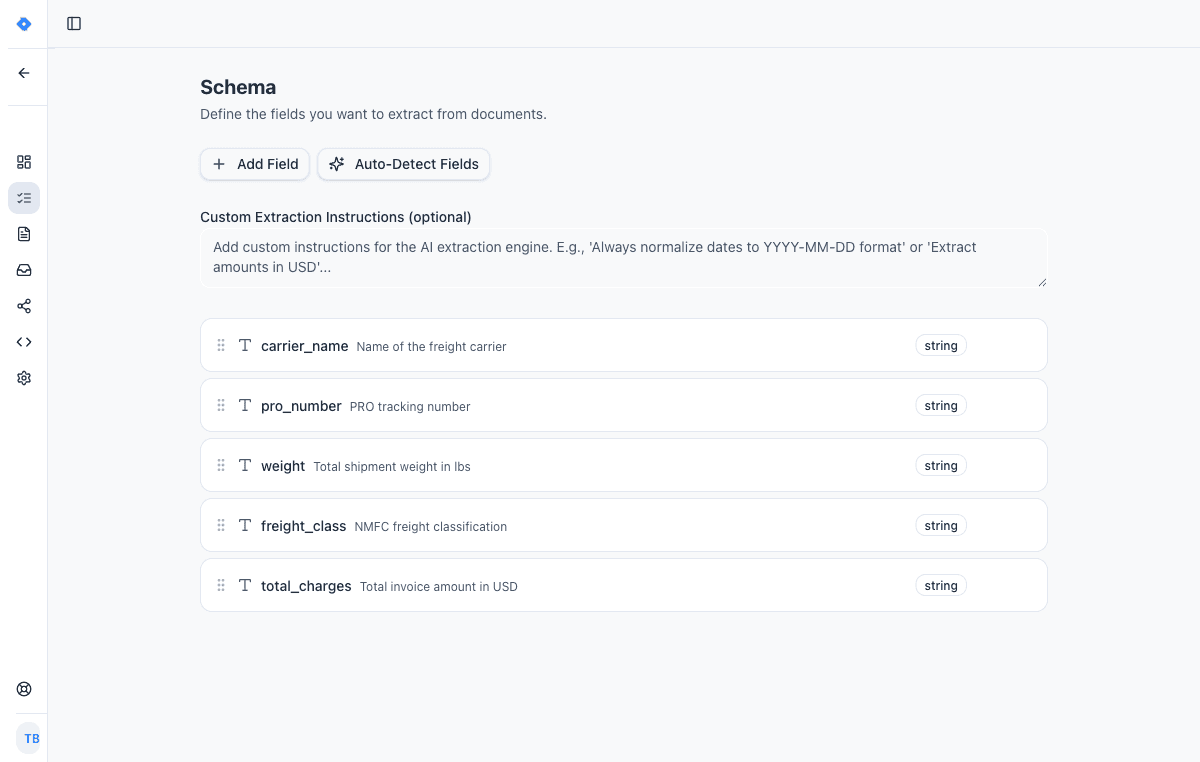
Define your schema
Tell the AI exactly what data to extract. Add fields like “invoice number”, “line items”, or “total amount” — choose from 15 field types including tables, objects, and lists.
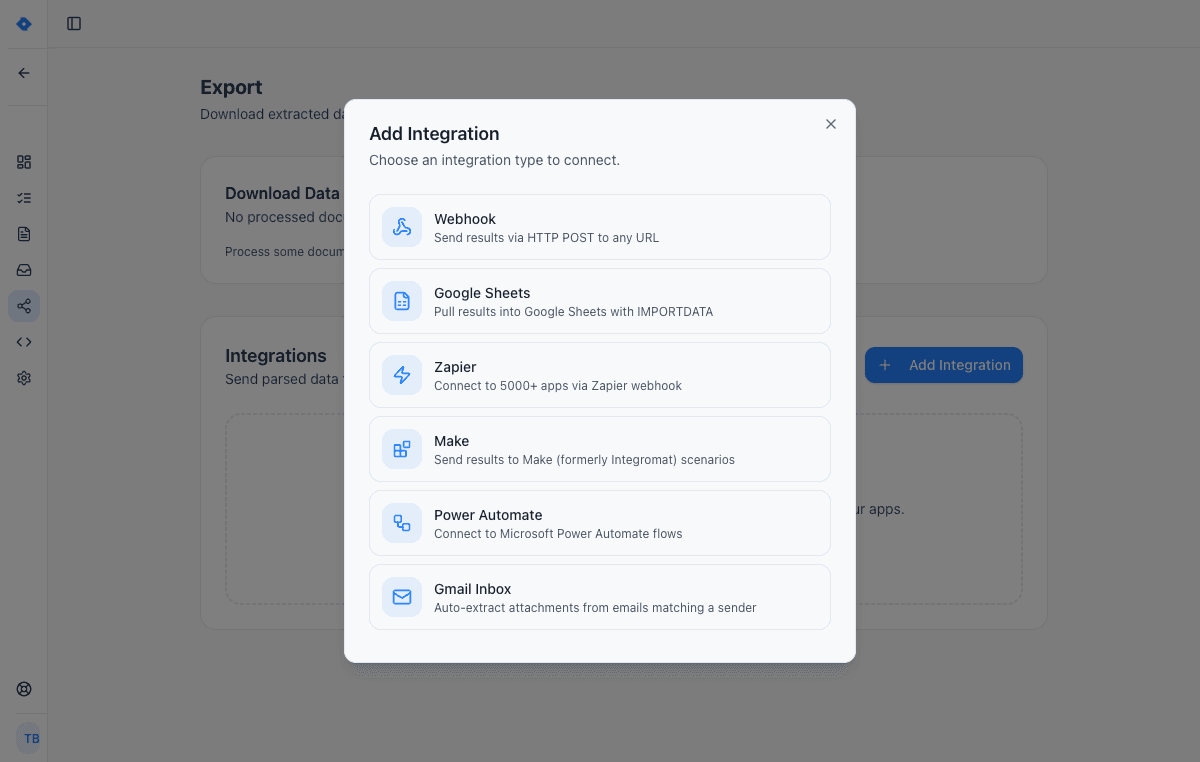
Connect your tools
Send extracted data wherever you need it — Google Sheets, Zapier, Make, Power Automate, webhooks, or Gmail inbox. One-click setup, no code required.
Code Example
Get Started in Minutes
const response = await fetch('https://api.parsli.co/v1/extract', {
  method: 'POST',
  headers: {
    'Authorization': 'Bearer YOUR_API_KEY',
    'Content-Type': 'application/json'
  },
  body: JSON.stringify({
    document_url: 'https://example.com/invoice.pdf',
    schema_id: 'inv_schema_001'
  })
});

const { data } = await response.json();
console.log(data.fields);
// {
//   invoice_number: "INV-2026-001",
//   vendor: "Acme Corp",
//   total: "$1,362.50",
//   line_items: [
//     { description: "Widget A", qty: 10, amount: "$1,000.00" },
//     { description: "Widget B", qty: 5, amount: "$250.00" }
//   ]
// }
Features
Why teams choose Parsli
Simple REST API
Clean RESTful endpoints with clear documentation. Authenticate with an API key. Extract with a single POST request.
Any Document Type
PDF, JPEG, PNG, TIFF, Word — send any document format. You can even [extract data from Excel to JSON](/guides/extract-data-from-excel-to-json). Built-in OCR handles scanned and image-based documents.
Custom Extraction Schemas
Define exactly what fields to extract with types, validation rules, and natural language instructions.
Sub-3-Second Processing
Most documents are processed in under 3 seconds. Built for production workloads with reliable uptime.
No credit card required · 30 free pages/month
What Is a Document Parsing API?
A document parsing API is a web service that accepts a document (PDF, image, scan) and returns structured data — typically as JSON. Instead of building your own OCR and extraction pipeline, you send the document to an API endpoint, and it returns the extracted fields.
Parsli's API goes beyond basic OCR. It uses Google Gemini 2.5 Pro to understand document structure, context, and semantics. You define a schema describing the fields you need, and the AI extracts them from any document layout — no templates, no training data, no per-format configuration.
How to Integrate Document Extraction into Your App
Integration takes three steps: (1) Create an extraction schema in the Parsli dashboard defining your fields. (2) Get your API key. (3) Send a POST request with your document and schema ID. The response is structured JSON you can immediately use in your application.
Parsli supports both synchronous extraction (response includes results) and webhook callbacks for async processing. SDKs are available for Python, Node.js, and cURL examples are in the docs. Most developers have a working integration in under 30 minutes.
Building Your Own OCR vs Using an API
Building an in-house document parsing pipeline typically requires: Tesseract or a commercial OCR engine, text extraction and cleanup, custom parsing logic per document type, table detection, and ongoing maintenance. That's 2-4 weeks of development per document type, plus infra costs and maintenance.
A document parsing API like Parsli replaces all of that with a single endpoint. You get AI-powered extraction that handles any document type — from [contracts](/guides/extract-data-from-contracts) and [medical records](/guides/extract-data-from-medical-records) to [insurance claims](/guides/extract-data-from-insurance-claims) and [tax forms](/guides/extract-data-from-tax-forms) — any layout, with built-in OCR, all for a predictable per-page price. The trade-off is straightforward: build and maintain it yourself, or pay per page for a solution that just works.
FAQ
Frequently asked questions
How do I authenticate with the API?
Use a Bearer token with your API key in the Authorization header. Get your key from the Parsli dashboard — takes 30 seconds.
What document formats does the API accept?
PDF, JPEG, PNG, TIFF, Word (.docx), and Excel (.xlsx). Send documents as a URL or base64-encoded payload.
How fast is the API?
Most documents are processed in under 3 seconds. Built for production workloads with reliable uptime and consistent response times.
Can I define custom extraction schemas?
Yes. Create schemas in the dashboard with custom fields, types (text, number, date, table, list), and natural language instructions to guide the AI.
Is there a free tier?
Yes. 30 free pages per month with no credit card required. Paid plans start at $20/month for higher volumes.
Do you support webhooks for async processing?
Yes. Configure webhook callbacks to receive results when extraction completes. Ideal for [batch document processing](/guides/batch-process-documents-automatically) and background jobs.
Explore
One platform, every document type
Same AI extraction engine for all your document processing needs
Convert Any PDF to Excel
In Seconds, Not Hours
Learn moreAutomate Invoice Parsing
With AI, Not Templates
Learn moreConvert Bank Statements to Excel
Instantly, From Any Bank
Learn moreParse Any Document
Without Writing Code
Learn moreAutomate Logistics Document Processing
From Loading Dock to Database
Learn moreAI Document Parser
That Actually Works
Learn moreIntelligent Document Processing
Without the Enterprise Price Tag
Learn moreAI-Powered Email Management
Extract Data, Not Just Read
Learn moreDocument Processing Software
Powered by AI, Not Templates
Learn moreAI Invoice Processing
Zero Templates, Any Vendor
Learn moreRelated workflows
Specific workflows this solution powers end-to-end.
Document Automation
Build end-to-end document processing workflows without writing code. From document ingestion to data extraction to delivery — fully automated.
PDF Data Extraction
Turn any PDF into structured, usable data. Parsli's AI reads text, tables, forms, and even [handwritten content](/guides/extract-data-from-handwritten-documents) from both digital and scanned PDFs.
Intelligent Document Processing
Go beyond basic OCR with AI-powered intelligent document processing. Parsli understands document layouts, extracts structured data, and delivers results to your systems automatically.
Works with your stack
Route extracted data straight into the tools your team already uses.
REST API
A developer-friendly REST API for extracting structured data from documents. Send files, receive typed JSON. Standard HTTP conventions with Bearer token authentication.
Webhooks
Full webhook support for both sending documents to Parsli and receiving extracted data. Connect to any HTTP endpoint with standard authentication options.
Make
Build powerful visual automations with Make. When Parsli processes a document, extracted data flows into your Make scenario for routing, transformation, and delivery. Follow our guide to [automate receipt processing with Make](/guides/automate-receipt-processing-with-make).
Zapier
Use Parsli to extract structured data from any email or document, then use Zapier to route the data to any of 5,000+ apps — CRMs, databases, project tools. Parsli replaces Zapier's built-in Email Parser with real AI; Zapier handles the routing.
Documents we parse
Specific document formats this solution handles out of the box.
Industries using this
Teams in these verticals commonly deploy this solution.
Ready to stop building document parsing infrastructure?
Start extracting structured data in minutes. No credit card required.
No credit card required · 30 free pages/month · Cancel anytime