Automate Invoice Parsing
With AI, Not Templates
Extract invoice numbers, line items, totals, and vendor details from any invoice format — PDFs, scans, or images. No templates or rules to configure.
No credit card required · 30 free pages/month
Why Parsli?
Skip the template-based parsing mess
Without Parsli
- Every vendor sends a different invoice layout
- Manual data entry into accounting software
- Template-based parsers break on new formats
- Scanned or photographed invoices are unreadable
- Hours spent on data entry instead of analysis
With Parsli
- AI reads any invoice layout without templates
- Data flows directly to your accounting tools
- Adapts to new vendor formats automatically
- Built-in OCR handles scans and photos
- Process a full invoice in under 3 seconds
Eliminate 90% of manual invoice data entry.
No Templates Needed
Unlike template-based parsers, Parsli's AI adapts to any vendor's invoice format automatically. New vendor? Just send the invoice — no setup required.
Compatibility
Every document format supported
How It Works
Three steps to structured data
Send Your Invoice
Upload directly, forward via email, or send through the API. Any format works — PDF, image, or scan.
AI Reads and Extracts All Fields
Parsli identifies vendor name, invoice number, line items, taxes, totals, and every field you define.
Data Flows to Your Tools
Extracted data lands in Google Sheets, your accounting software, or your own systems via webhooks and API.
See It In Action
From document to structured data in minutes
No complex setup. No code required. Just define what you need and let AI do the rest.
Create a parser
Give your parser a name and description. Each parser is a reusable extraction template — create one for invoices, another for receipts, another for contracts.

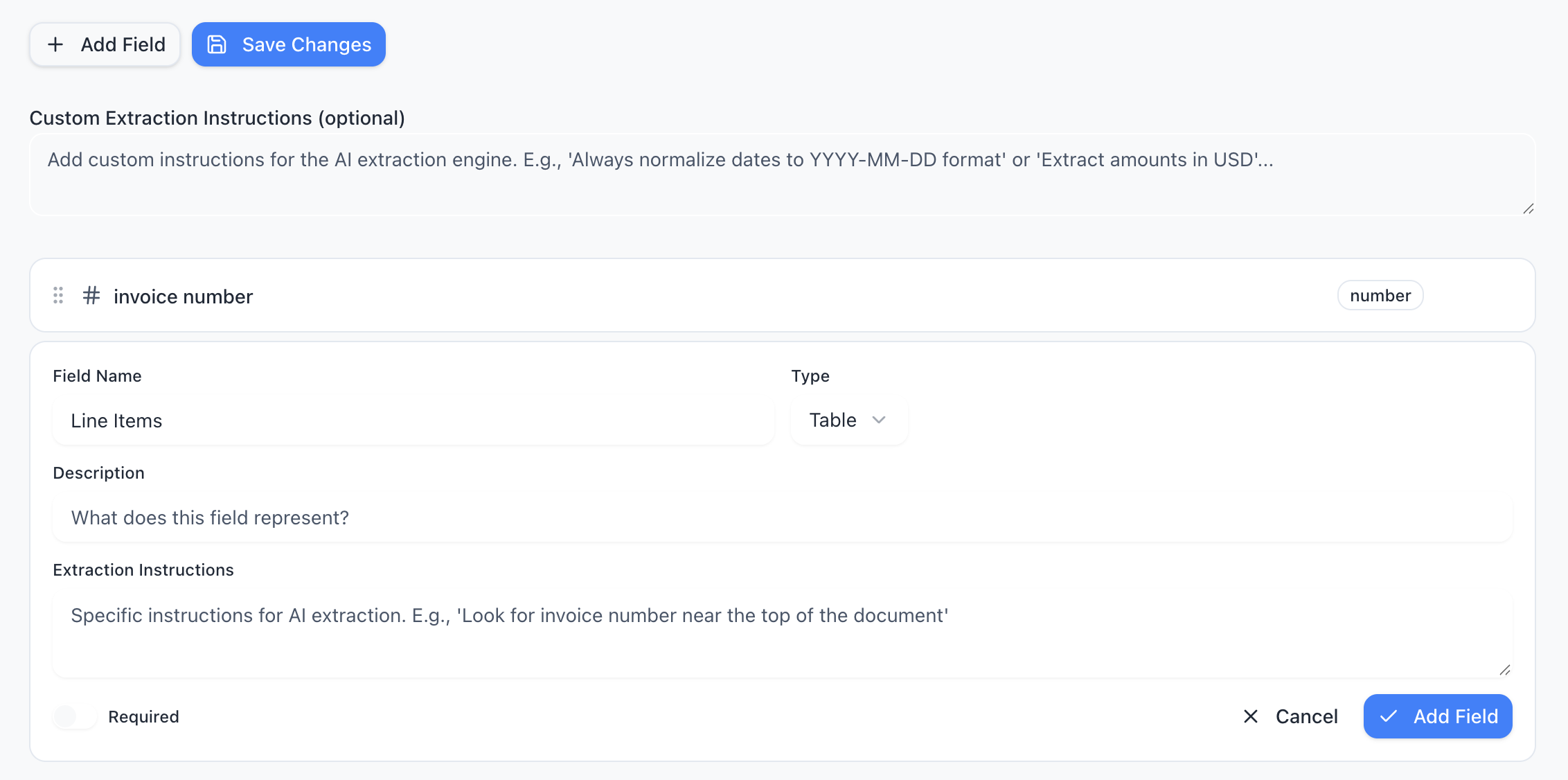
Define your schema
Tell the AI exactly what data to extract. Add fields like “invoice number”, “line items”, or “total amount” — choose from 15 field types including tables, objects, and lists.
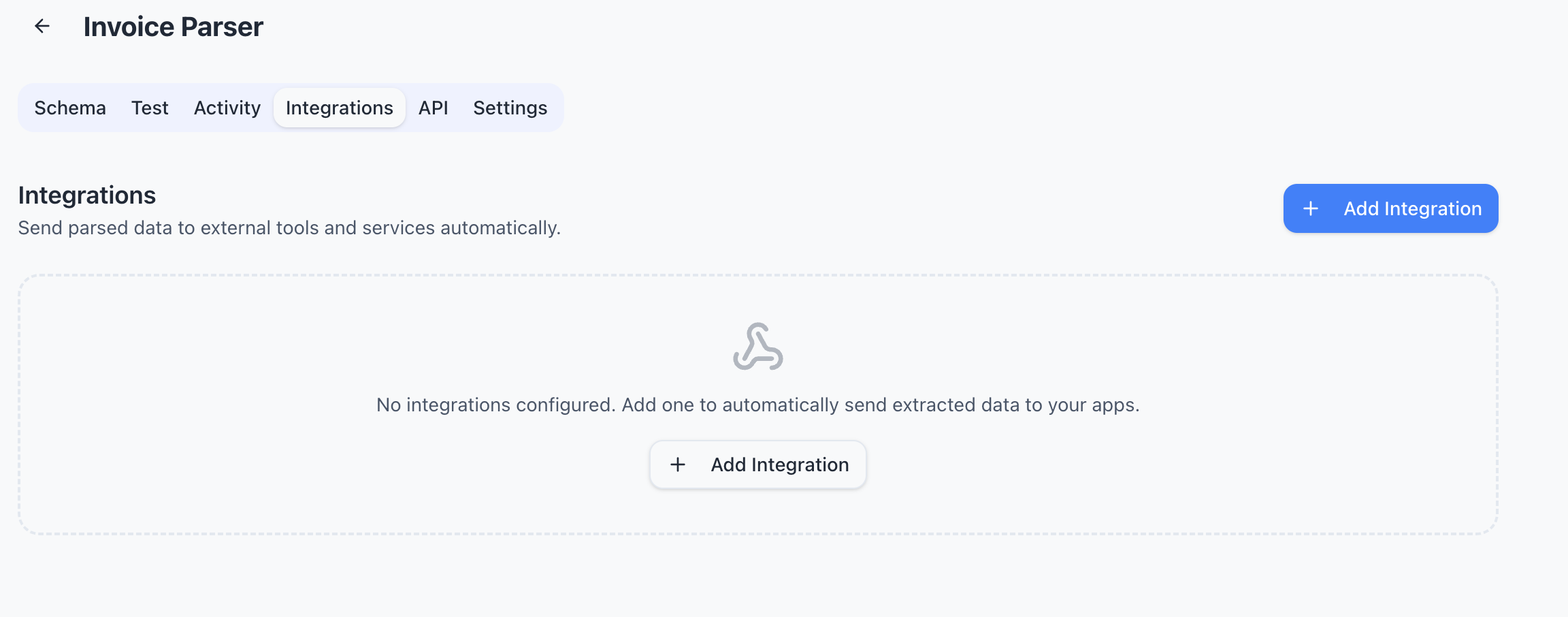
Connect your tools
Send extracted data wherever you need it — Google Sheets, Zapier, Make, Power Automate, webhooks, or Gmail inbox. One-click setup, no code required.
Features
Why teams choose Parsli
Works on Any Invoice Layout
No templates or zones to configure. Parsli's AI understands document structure, so it handles any vendor's invoice format out of the box.
Accurate Line Item Extraction
Multi-row tables with description, quantity, unit price, and totals — extracted correctly every time.
Handles Scanned Invoices
Photographed or scanned invoices are processed with built-in OCR. No clean PDF required.
Integrates with Your Workflow
Connect to QuickBooks, Xero, Google Sheets, or any tool via Zapier, Make, webhooks, or REST API.
No credit card required · 30 free pages/month
Why Automate Invoice Processing?
If your team processes more than 50 invoices per month, manual data entry is costing you real money. An AP clerk spends 3-5 minutes per invoice on data entry — that's 4+ hours per week just on typing. And manual entry has a 1-4% error rate, which means incorrect payments, duplicate entries, and time spent fixing mistakes.
Automated invoice parsing eliminates the data entry step entirely. The AI reads the invoice, extracts the fields you need, and sends structured data to your accounting system. Your team reviews and approves instead of typing — which is faster, more accurate, and far less tedious.
What Data Can Be Extracted from Invoices?
Parsli extracts every standard invoice field: invoice number, date, due date, vendor name and address, PO number, line items (description, quantity, unit price, amount), subtotal, tax, discounts, and total. You can also define custom fields — like project codes, department names, or GL codes — using natural language instructions in the schema builder.
For line item tables, the AI handles multi-row descriptions, merged cells, and varying column layouts. It doesn't rely on fixed positions or templates — it reads the table the way you would.
Template-Based Parsing vs AI Parsing
Traditional invoice parsers (like Docparser or older versions of Parseur) require you to create a template for each document layout. You draw zones around fields, set extraction rules, and test. When a vendor changes their invoice design — or you onboard a new vendor — you create a new template.
AI parsing skips all of that. Parsli's AI understands document structure without templates. It reads the full context of the page, identifies fields semantically, and extracts data regardless of layout. New vendor? Just send the invoice. No setup required.
FAQ
Frequently asked questions
Can Parsli handle invoices from different vendors?
Yes. The AI adapts to any vendor's invoice format without templates or per-vendor configuration. Just send the invoice and Parsli extracts the data.
What fields can be extracted from invoices?
Invoice number, dates, vendor details, PO number, line items (description, quantity, unit price, amount), subtotal, tax, discounts, total, and any custom fields you define.
Can I process emailed invoices automatically?
Yes. Forward invoices to your Parsli inbox or connect Gmail for automatic processing. Extracted data flows to your tools without manual intervention.
How does AI parsing compare to template-based parsing?
AI parsing requires zero setup per vendor and adapts to layout changes automatically. Template-based parsers need manual configuration for each format and break when layouts change.
Is there an API for invoice processing?
Yes. Send invoices via REST API and get structured JSON back in under 3 seconds. Perfect for integrating invoice extraction into your own applications.
Explore
One platform, every document type
Same AI extraction engine for all your document processing needs
Ready to stop entering invoice data manually?
Start extracting structured data in minutes. No credit card required.
No credit card required · 30 free pages/month · Cancel anytime